Saturday, 3 May 2014

32 Ways to Trip a Google Spam Filter

0 comments
we are providing some trip a Google Spam Filter by the reference of popular news sites.

Ever wonder how or why your website lost its once favorable rankings in Google? If you want to stay on the good side of Matt Cutts and Google and potentially activate a Google spam filter, never implement any of the these 32 tactics --
  1. Register a domain with a trademarked word in the name with the intent of profiting off of ad revenue by "repurposing" content scraped from a rival site.
  2. Register a domain name that is a misspelled version of a popular website, brand, or online rival in an attempt to misdirect search referred traffic.
  3. Surreptitiously place affiliate cookies on computers when viewing or sharing content on the site.
  4. Example: A spammer inserts a URL to a fake image on a message board that puts affiliate cookies on the computers of forum visitors.
  5. Use unnecessary redirects, especially when visitors hit the homepage to enter the site from a search engine.
  6. Have all primary navigation require Flash, Java or JavaScript to function, especially when combined with very little textual content on web pages, to muddle contextual search signs.
  7. Present the homepage as a "splash page" or otherwise content-less document, replace the homepage URL regularly with a new file name, and don't bother to redirect the old homepage URL.
  8. Use frames on critical landing pages and high-level categories.
  9. Target demographics on social networking sites and message people with blatant advertisements.
  10. Include numerous ampersands, session IDs or user IDs in URL constructs, and do not canonicalize to unappended URLs.
  11. Ping servers site several times per minute with new content notifications to give the illusion that there is constant flow of new content on a page.
  12. Use the same title tag on all or most pages in the site or use title tags that lack meaning on critical landing pages, and never change the title tags.
  13. Have error pages in the search results that produce "Session Expired" experiences for visitors referred to the website.
  14. Have the 404-Page "File Not Found" error return a 200-status OK response code to search bots.
  15. Only use "Click Here," "Read More," or other redundant phrases for important anchor text links.
  16. Use site wide navigational constructs, such as dropdown, pop-up, and flyover boxes to obfuscate contextual relevancy signals for search bots.
  17. Present hidden or small text meant only to search engine spiders.
  18. Engage in "keyword stuffing" and use obviously irrelevant keywords in meta tags on a site-wide basis.
  19. Buy expired domains with high traffic histories and redirect to unrelated web content.
  20. Have content read like it was machine generated with search query phrases dynamic inserted in the content.
  21. Scrape other sites content and aggregate it on "doorway pages" throughout the site.
  22. Repeatedly present search engines different content then humans receive when visiting the site.
  23. Participate in "link farms" or "free for all" link exchanges that have a large number of unrelated topics directing visitors to different URLs on every page within the site.
  24. Duplicate the same content cross multiple subdomains rather than investing in search engine friendly load balancing processes.
  25. Invite and allow comment spamming on most pages within the site.
  26. Don't link out to any other sites or predominantly link to dubious sites with highly descriptive anchor text.
  27. Create hundreds of personas to "echo" social signals across different social venues.
  28. Hide links in images or embed links in places that are "off screen" to most site visitors.
  29. Buy links as a "sponsor" or embed links in unrelated web tools or widgets.
  30. Try to cozy up to sites that predominantly link to off-topic topics such as casinos or online pharmaceuticals.
  31. Suddenly introduce a lot of new, highly searchable trending phrases into the body copy of stagnant old articles.
  32. Put a headshot of Google's Matt Cutts on unflattering images or produce a video with the Google spam chief's image.
Note: If you're still confused about what you can do to stay on the good side of Google, never implement any of the tactics mentioned here today.
Click here to Read More

Wednesday, 23 April 2014

Free Indian Classified Sites List - No Ads, No Pop Ups

8 comments
Here, We provides list of free classified ads posting site in India. I have manually checked every classified site to make sure you get only top quality sites without any irritating pop-ups or ads.

http://delhi.craigslist.co.in
http://www.global-free-classified-ads.com
https://in.claseek.com 
http://www.expatriates.com 
http://www.click.in
http://www.adeex.in 
http://www.khojle.in 
http://adsandclassifieds.com
http://www.locanto.in
http://www.olx.in
http://classifieds.sulekha.com
http://www.quikr.com 
http://www.vivastreet.co.in
http://www.openfreeads.com
http://www.classtize.com
http://createfreeads.com
http://tuffclassified.com
http://in.eraju.com
http://classifiedads4u.in
http://freeadsarena.com 
http://www.submitclick.com 
http://www.getadsonline.com 
http://www.ethansvu.com 
http://www.desigoogly.com 
http://www.freeadswebsite.com 
http://www.adup.in 
http://www.linegate.com 
http://www.dirget.com 
http://www.classifiedsadda.com 
http://www.zoomkerala.in 
http://www.ohoot.com 
http://www.dooleenoted.com
http://www.adsfeast.com 
http://www.adpiece.in 
http://www.locanto.in 
http://www.famousfunda.com 
http://www.themirch.com
http://www.postallads4free.com 
http://www.newfreeads.com 
http://www.post2find.com 
http://www.adhuge.com 
http://www.sahipasand.com 
http://www.classifiedempire.com 
http://www.starads.in 
http://www.staffingagenciesinpakistan.com 
http://www.classiment.com 
http://www.elzse.com 
http://www.netads.in 
http://www.sunclassifiedads.com 
http://www.thecityads.com 
http://www.sticknobills.com 
http://www.targro.com 
http://www.clicads.in 
http://www.indianadz.com
Click here to Read More

Friday, 4 April 2014

Social Bookmarking Sites - No Ads, No Pop-Ups

4 comments
Here I am giving good sites for Social Bookmarking without any irritating ads and pop-ups, Just Bookmark your site in these dofollow social bookmarking sites to get better result..

http://2prsubmit.com
http://dailybookmarkhit.com
http://livebookmarkhit.com
http://pr5bookmarks.com
http://livebookmarktraffic.com
http://4everbookmarks.com
http://4prhit.com
http://6prhit.com
http://5prsubmit.com
http://addlinkhit.com
http://bookmarkaction.com
http://linkbookmarking.com
http://playhitbookmarks.com
http://lifestylehit.com
http://limesubmit.com
http://pr8bookmarks.com
http://stylesubmit.com
http://submit4hit.com
http://pr9bookmarks.com
http://pr7bookmarks.com
http://3prbookmarks.com
http://pr1bookmarks.com
http://pr3bookmarks.com
http://pr4bookmarks.com
http://pr2bookmarks.com
http://6prbookmarks.com
http://submitsitelinkhit.com
http://7prbookmarks.com
http://pr5sitesubmit.com
http://pr2linking.com
http://submitlinkhit.com
http://pr6linking.com
http://pr5linking.com
http://pr7sitelinking.com
http://submitlinking.com
http://5prbookmarks.com
http://pr5link2hit.com
http://bookmarkingforever.com
http://bookmarks4ever.com
http://highprbookmarks.com
http://pr6link2hit.com
http://pr3linking.com
http://pr4linking.com
http://pr7hitlinks.com
Click here to Read More

Wednesday, 19 February 2014

‘Not Set’ and ‘Not Provided’ are Most Confusing Identifiers in Google Analytics

3 comments
In this post I explain the difference between "not set" and "not provided" in Google Analytics.
Not Set:
The ‘keyword’ (not set) simply identifies traffic that doesn’t arrive via a particular keyword and hence may not come via any search at all. This includes traffic coming from email, referral sites, or even things like Google Images. The latter might be confusing, but it helps to know that visitors coming from Google Images and Google Maps are classified under referrals with the source google.com, not organic search. Because keywords are automatically set for search traffic, the (not set) keyword will never appear in your organic Search reports, so it is likely something you won’t have to worry about. Don’t consider this one in light of keyword performance!


In Simple Words - ‘not set’ means that the user didn’t come to your site through a keyword. They came to your site directly or through a referral site.
 

Not Provided:
Keywords are organic searches from Google but are being hidden from your website since Google is encrypting searches from users (secure searches from users who are logged in to their Google Accounts or otherwise using the secure version of Google.


Simply Say - any keywords searched organically by users who are logged into their Google Accounts (Gmail, Calendar, Apps, etc) will show up in your Analytics reports as (not provided).

Why is Google doing this? Google cites security and privacy reasons for hiding this data.
 

Firefox Adding to The Problem: The most recent Firefox browser update includes encryption of all Google searches by default, regardless if the user is signed in or not. This occurred in late July 2012 and has caused “Not Provided” numbers to increase.
 

What this means for you: On average we are seeing approximately 25% (and as high as 50%) of the search term data being hidden in the Not Provided keyword category. This makes year over year keyword analysis difficult as the data will obviously be skewed. This also makes casual keyword research using current data inaccurate.
 

Just keep in mind:
(Not Set) = Not Search Engine, Referrals and Direct links
(Not Provided) = Protected by Google encryption
 

I welcome your insight and expertise in the comments, because I am honestly stumped on these issues.
Click here to Read More

Tuesday, 11 February 2014

New Google Update "Top Heavy Algorithm" has been Launched in Feb - 2014

10 comments

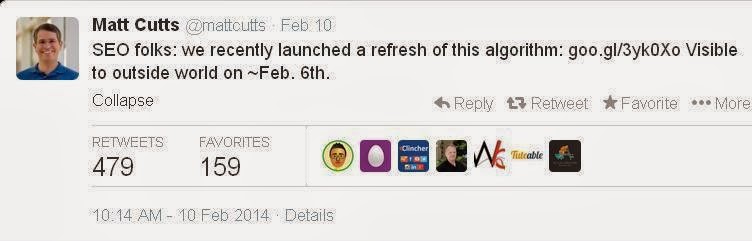
Google’s head of search spam, Matt Cutts, announced that Google has released a refresh of its Page Layout Algorithm. The filter, also known as the Top Heavy algorithm, downgrades the ranking of a web page with too many ads at the top or if the ads are deemed too distracting for users.

This would be the third confirmed update to the Top Heavy algorithm, with the full release schedule as follows:
  • Top Heavy 1: Jan. 19, 2012 (impacted less than 1% of English searches)
  • Top Heavy 2: Oct. 9, 2012 (impacted 0.7% of English searches)
Background On & Recovering From Top Heavy
What is the page layout algorithm? As we quoted from Google originally:
We’ve heard complaints from users that if they click on a result and it’s difficult to find the actual content, they aren’t happy with the experience. Rather than scrolling down the page past a slew of ads, users want to see content right away.

So sites that don’t have much content “above-the-fold” can be affected by this change. If you click on a website and the part of the website you see first either doesn’t have a lot of visible content above-the-fold or dedicates a large fraction of the site’s initial screen real estate to ads, that’s not a very good user experience.

Such sites may not rank as highly going forward.

See also our original article for when Top Heavy was first released, for advice about how a site that’s caught may have to wait until the next release for any changes it’s made to restore rankings.

We have not seen many complaints within the SEO community around February 6th or 7th about any update like this, which suggests it impacted fewer sites than when Google updates other filters like the Panda or Penguin algorithms.

Cutts said the algorithm was refreshed last Thursday, February 6. Here’s his tweet:
Click here to Read More
 

Art of Search Engine. Copyright 2012 All Rights Reserved True SEO Services by SEO Technology