Wednesday, 19 February 2014

‘Not Set’ and ‘Not Provided’ are Most Confusing Identifiers in Google Analytics

3 comments
In this post I explain the difference between "not set" and "not provided" in Google Analytics.
Not Set:
The ‘keyword’ (not set) simply identifies traffic that doesn’t arrive via a particular keyword and hence may not come via any search at all. This includes traffic coming from email, referral sites, or even things like Google Images. The latter might be confusing, but it helps to know that visitors coming from Google Images and Google Maps are classified under referrals with the source google.com, not organic search. Because keywords are automatically set for search traffic, the (not set) keyword will never appear in your organic Search reports, so it is likely something you won’t have to worry about. Don’t consider this one in light of keyword performance!


In Simple Words - ‘not set’ means that the user didn’t come to your site through a keyword. They came to your site directly or through a referral site.
 

Not Provided:
Keywords are organic searches from Google but are being hidden from your website since Google is encrypting searches from users (secure searches from users who are logged in to their Google Accounts or otherwise using the secure version of Google.


Simply Say - any keywords searched organically by users who are logged into their Google Accounts (Gmail, Calendar, Apps, etc) will show up in your Analytics reports as (not provided).

Why is Google doing this? Google cites security and privacy reasons for hiding this data.
 

Firefox Adding to The Problem: The most recent Firefox browser update includes encryption of all Google searches by default, regardless if the user is signed in or not. This occurred in late July 2012 and has caused “Not Provided” numbers to increase.
 

What this means for you: On average we are seeing approximately 25% (and as high as 50%) of the search term data being hidden in the Not Provided keyword category. This makes year over year keyword analysis difficult as the data will obviously be skewed. This also makes casual keyword research using current data inaccurate.
 

Just keep in mind:
(Not Set) = Not Search Engine, Referrals and Direct links
(Not Provided) = Protected by Google encryption
 

I welcome your insight and expertise in the comments, because I am honestly stumped on these issues.
Click here to Read More

Tuesday, 11 February 2014

New Google Update "Top Heavy Algorithm" has been Launched in Feb - 2014

10 comments

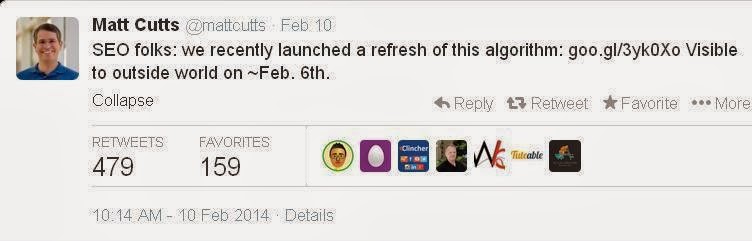
Google’s head of search spam, Matt Cutts, announced that Google has released a refresh of its Page Layout Algorithm. The filter, also known as the Top Heavy algorithm, downgrades the ranking of a web page with too many ads at the top or if the ads are deemed too distracting for users.

This would be the third confirmed update to the Top Heavy algorithm, with the full release schedule as follows:
  • Top Heavy 1: Jan. 19, 2012 (impacted less than 1% of English searches)
  • Top Heavy 2: Oct. 9, 2012 (impacted 0.7% of English searches)
Background On & Recovering From Top Heavy
What is the page layout algorithm? As we quoted from Google originally:
We’ve heard complaints from users that if they click on a result and it’s difficult to find the actual content, they aren’t happy with the experience. Rather than scrolling down the page past a slew of ads, users want to see content right away.

So sites that don’t have much content “above-the-fold” can be affected by this change. If you click on a website and the part of the website you see first either doesn’t have a lot of visible content above-the-fold or dedicates a large fraction of the site’s initial screen real estate to ads, that’s not a very good user experience.

Such sites may not rank as highly going forward.

See also our original article for when Top Heavy was first released, for advice about how a site that’s caught may have to wait until the next release for any changes it’s made to restore rankings.

We have not seen many complaints within the SEO community around February 6th or 7th about any update like this, which suggests it impacted fewer sites than when Google updates other filters like the Panda or Penguin algorithms.

Cutts said the algorithm was refreshed last Thursday, February 6. Here’s his tweet:
Click here to Read More

Thursday, 26 December 2013

What is an SEO-Friendly URL structure?

3 comments
First of all, let me start by saying that it is always better to call in an SEO manager early in the development stage, so that there is no need to make sometimes hard-to-implement tweaks afterwards.

Some content management systems bake poor URL structures right into their websites. Lax rules can be a culprit, for example, not encoding spaces or special characters.
From an SEO point of view, a site’s URL structure should be:

Straightforward: URLs with duplicate content should have canonical URLs specified for them; there should be no confusing redirects on the site, etc.

Meaningful: URL names should have keywords in them, not gibbering numbers and punctuation marks.

With emphasis on the right URLs: SEO-wise, not all URLs on a site are of equal importance as a rule. Some even should be concealed from the search engines. At the same time, it is important to check that the pages that ought to be accessible to the search engines are actually open for crawling and indexing.

So, here is what one can do to achieve an SEO-friendly site URL structure:

1- Consolidate your www and the non-www domain versions

As a rule, there are two major versions of your domain indexed in the search engines, the www and the non-www version of it. These can be consolidated in more than one way, but I’d mention the most widely accepted practice.

Canonical issues, parameters that do not change page content, loose adherence to coding standards, or any number of reasons will create duplicate content.
Options for dealing with duplicate content include:
  • Reconfigure the content management platform to generate one consistent URL for each page of content.
  • 301 redirect duplicate URLs to the correct version.
  • Add canonical tags to webpages that direct search engines to group duplicate content and combine their ranking signals.
  • Configure URL parameters in webmaster tools and direct search engines to ignore any parameters that cause duplicate content (Configuration >> Settings >> Preferred Domain).

2- Avoid dynamic and relative URLs

Depending on your content management system, the URLs it generates may be “pretty” like this one:

www.example.com/topic-name
or “ugly” like this one:
www.example.com/?p=578544

As I said earlier, search engines have no problem with either variant, but for certain reasons it’s better to use static (prettier) URLs rather than dynamic (uglier) ones. Thing is, static URLs contain your keywords and are more user-friendly, since one can figure out what the page is about just by looking at the static URL’s name.
Besides, Google recommends using hyphens (-) instead of underscores (_) in URL names, since a phrase in which the words are connected using underscores is treated by Google as one single word, e.g. one_single_word is onesingleword to Google.

And, to check what other elements of your page should have the same keywords as your URLs.
Besides, some web devs make use of relative URLs. The problem with relative URLs is that they are dependent on the context in which they occur. Once the context changes, the URL may not work. SEO-wise, it is better to use absolute URLs instead of relative ones, since the former are what search engines prefer.

Now, sometimes different parameters can be added to the URL for analytics tracking or other reasons (such as sid, utm, etc.) To make sure that these parameters don’t make the number of URLs with duplicate content grow over the top, you can do either of the following:
  • Ask Google to disregard certain URL parameters in Google Webmaster Tools in Configuration > URL Parameters.
  • See if your content management system allows you to solidify URLs with additional parameters with their shorter counterparts.
3- Avoid Mixed Case
URLs, in general, are 'case-sensitive' (with the exception of machine names). Mixed case URLs can be a source of duplicate content. These are not the same URLs,
  • http://example.com/Welcome-Page
  • http://example.com/welcome-page
The easiest way to deal with mixed case URLs is to have your website automatically rewrite all URLs to lower case. With this one change, you never have to worry if the search engines are dealing with it automatically or not.
Another great reason to rewrite all URLs to lower case is it will simplify any case sensitive SEO and analytics reports. That alone is pure gold.

4- Create an XML Sitemap

An XML Sitemap is not to be confused with the HTML sitemap. The former is for the search engines, while the latter is mostly designed for human users.
What is an XML Sitemap? In plain words, it’s a list of your site’s URLs that you submit to the search engines. This serves two purposes:
  1. This helps search engines find your site’s pages more easily;
  2. Search engines can use the Sitemap as a reference when choosing canonical URLs on your site.
The word “canonical” simply means “preferred” in this case. Picking a preferred (canonical) URL becomes necessary when search engines see duplicate pages on your site.
So, as they don’t want any duplicates in the search results, search engines use a special algorithm to identify duplicate pages and pick just one URL to represent the group in the search results. Other webpages just get filtered out.
Now, back to sitemaps … One of the criteria search engines may use to pick a canonical URL for the group of webpages is whether this URL is mentioned in the website’s Sitemap.
So, what webpages should be included into your sitemap, all of your site’s pages or not? In fact, for SEO-reasons, it’s recommended to include only the webpages you’d like to show up in search.

4. Close off irrelevant pages with robots.txt

There may be pages on your site that should be concealed from the search engines. These could be your “Terms and conditions” page, pages with sensitive information, etc. It’s better not to let these get indexed, since they usually don’t contain your target keywords and only dilute the semantic whole of your site.

The robotx.txt file contains instructions for the search engines as to what pages of your site should be ignored during the crawl. Such pages get a noindex attribute and do not show up in the search results.

Sometimes, however, unsavvy webmasters use noindex on the pages it should not be used. Hence, whenever you start doing SEO for a site, it is important to make sure that no pages that should be ranking in search have the noindex attribute.

Conclusion: Having SEO-friendly URL structure on a site means having the URL structure that helps the site rank higher in the search results. While, from the point of view of web development, a particular site’s architecture may seem crystal-clear and error-free, for an SEO manager this could mean missing on certain ranking opportunities.

Click here to Read More

Tuesday, 17 December 2013

How to Promote a Indian Domain in USA?

11 comments
Dear Friends,

One of my friend Mr. Vishesh is asked me a very interesting question, that is - "I have a Indian new domain with extension ".in" and I need to promote this in usa, can i do this?"

My answer to my friend - "YESSS!! Domain is not a problem. Make sure you post quality content in your website that's the best way to bring visitors from all over the world."

Now here I explain in details, if you are agree/disagree with me please let me know by comment box.
 
If you want to get high SERP in any country,like USA ,you can submit your site to local directories,local search engines and local classified ad sites.and jion some local forums are also helpful to improve the SERP.


e.g- You just have to make the target country like USA

Do the following steps:

1) Do local publishing with valid local information and you have to local phone number too. But if you don't have then you can contact to purchase location based phone number.

2) Do best link building and most international. Because Google  USA is globally famous but if its not USA based like other country - France or Germany then you have to publish the same location and language based articles in location based websites.

3) Do local work most of with target city and country.

Then - you can get good response.

A quick example is also here

- If you have German language website then you need to do all German language articles, website publishing, local publishing, social bookmarking etc. i.e. you need to promote this in German language too., and your site also must have German version.
Click here to Read More

Thursday, 5 December 2013

Difference Detween Bad Directory and Good Directory Submission

1 comments
Directories are not all created equal. Some are good, some are bad, and some are just downright ugly. I will discuss each one here, so you can make better informed decisions when preparing for a directory submission campaign. Let me start off with the ugly and finish off with the good.


The Bad Directory:
I would say most directories fall into this category. They’re not completely bad, but have some characteristics that make them questionable or borderline. So, what constitutes a directory, bad?

  • Database dumped directories. Some directory owners simply import a database of categories. This may save time, but it doesn’t solve the problem of duplicate content and it certainly doesn’t provide a unique experience for users. I would say this is a gray area because sometimes the categories might not be unique, but they may have unique listings.
  • Little to no editorial discretion. If a directory is approving every paid submission, then it is pretty obvious that the main objective of the directory is to make money. While no one thinks it’s a bad idea to make money – to run a directory based on the sole purpose of making money is an unsustainable business model.
  • Low or no PageRank directories. This isn’t always a bad thing because it takes time for directories to gain PR. However, if the directory is aged, but still has a low PR, it could be a sign that Google may have issues with it.
  • Non-unique descriptions for listings. If the site has a bunch of copied descriptions for many of its listing, it could create duplicate content issues. This is bad SEO for not only the directory, but also all listings within it.

The Good Directory:
From my experience, I would that say only a handful of directories out there are worth submitting to. Probably like 1 or 2%. So, what makes a directory, good?

  • Nice and unique design. Although a unique design doesn’t make or break a directory, it does add a unique experience for users. Plus, having a unique design tells me that the directory owner is in it for the long-run and willing to invest money into their business.
  • Editorial discretion / human-edited reviews. If a directory rejects a lot of submissions, there’s a good chance that it has a pretty solid guideline for approvals. Human-edited listings allow the directory owner to maintain a level of quality for their directory. And in the end, the quality is what it’s about.
  • Clear site structure and layout. A directory that is SEO-Optimized with a clear navigational structure is good for both users and search engines.
  • High PageRank. New sites and subpages may take time to gain PR, so disregard if it is new. For aged directories, PageRank does mean something. It says that at least one or a few good sites are linking to it, and that Google is acknowledging it as being a page of importance.
  • Other features. Is it just a directory, or is the directory providing other features like tools, resources, and blog posts? Directories that offer more features are providing greater value for their users. This is a win-win situation for all.
When it comes to web directories, you need to look a little deeper than the surface. Sometimes there is more than meets the eye. Make sure to do some research on several directories before you begin submitting.
Click here to Read More
 

Art of Search Engine. Copyright 2012 All Rights Reserved True SEO Services by SEO Technology